3D Acoustic FWI on Overthrust with Torch
Source file:
examples/FWI/3d/acoustic/torch/fwi_overthrust.py
What This Example Does
This example runs 3D acoustic full-waveform inversion on the Overthrust model with one script that supports two propagator backends:
eager: pure PyTorch propagation throughPropTorch(..., backend="eager")cuda: compiled CUDA propagation throughPropTorch(..., backend="cuda")
The script:
- loads the 3D true and smooth Overthrust velocity models
- builds a 3D acoustic solver for the selected backend
- generates observed shot gathers from the true model
- inverts the smooth model by matching synthetic and observed data
Main Components
The solver is built from:
equation:Acoustic3D(...)propagator:PropTorch(...)wave: a Ricker waveletsources: a surface source grid overxandyreceivers: a surface receiver grid repeated for each shotmodels: the 3D velocity modelvp
Prepare the Overthrust Model Files
This example reads:
examples/models/overthrust/true_3d.npyexamples/models/overthrust/smooth_3d.npy
Generate them from the official SEG/EAGE Overthrust archive before running the example:
python3 examples/models/overthrust/download_3d_overthrust.py --extract
python3 examples/models/overthrust/convert_3d_overthrust_vites_to_npy.py
python3 examples/models/overthrust/make_smooth_model.py \
  --input examples/models/overthrust/true_3d.npy \
  --output examples/models/overthrust/smooth_3d.npy \
  --radii 6,6,6 \
  --passes 3
Optional preview:
python3 examples/models/overthrust/plot_true_smooth.py
The generated model files under examples/models/ are ignored by git. The
helper scripts in that directory remain tracked.
Backend Selection
Run the example with:
python3 examples/FWI/3d/acoustic/torch/fwi_overthrust.py --backend eager
python3 examples/FWI/3d/acoustic/torch/fwi_overthrust.py --backend cuda
Key Configuration
Shared configuration includes:
nt=1500,dt=0.002dh=25.0spatial_order=2abcn=10src_step=16,rec_step=4src_margin=8,rec_margin=4batchsize=4forward_batchsize=1model_stride_z=1,model_stride_y=4,model_stride_x=4
The script uses:
batchsize: the number of shots randomly selected for one optimizer stepforward_batchsize: the number of shots used at once when generating observed datatrain_shot_batchsize: an optional runtime override that splits the selected training shots into smaller chunks during one optimizer step
Memory Notes
This 3D example is much heavier than the 2D Marmousi examples.
Under the current default configuration, one reported CUDA run used about:
36671 MiB / 49140 MiB
This means the default settings may not fit on smaller GPUs.
The default training setup selects batchsize=4 shots per optimizer step. By
default those four shots are passed to the solver together, so memory demand is
set by a four-shot training batch.
If GPU memory is tight, keep the optimization batch at four shots but process them sequentially with gradient accumulation:
python3 examples/FWI/3d/acoustic/torch/fwi_overthrust.py --backend cuda --train-shot-batchsize 1
This runs one selected shot at a time inside each optimizer step and usually
reduces peak shot-related memory substantially. The reduction is often close to
the training batch ratio, but it is not guaranteed to be exactly 1/4 because
model storage, optimizer state, PML buffers, and other fixed allocations remain.
If needed, you can also reduce the number of selected shots per optimizer step:
python3 examples/FWI/3d/acoustic/torch/fwi_overthrust.py --backend cuda --batchsize 1
That further lowers memory use, but it also changes the optimization behavior because each step then uses only one shot instead of four.
Geometry
The example uses a surface acquisition spread in 3D:
- sources are sampled on an
x-ygrid with spacingsrc_step - receivers are sampled on an
x-ygrid with spacingrec_step - all sources use the same depth
srcz - all receivers use the same depth
recz
The final array shapes are:
sources:(nshots, 3)receivers:(nshots, nreceivers, 3)
Inversion Workflow
Observed data is generated first from the true model, then the inversion updates
the smooth model with torch.optim.Adam.
At each iteration, the script:
- selects a random subset of
batchsizeshots - optionally splits that subset into chunks of
train_shot_batchsize - computes synthetic data and accumulates gradients chunk by chunk
- updates the model once after the full selected batch has contributed
Outputs
The script creates an output directory under examples/FWI/3d/acoustic/torch/
and saves:
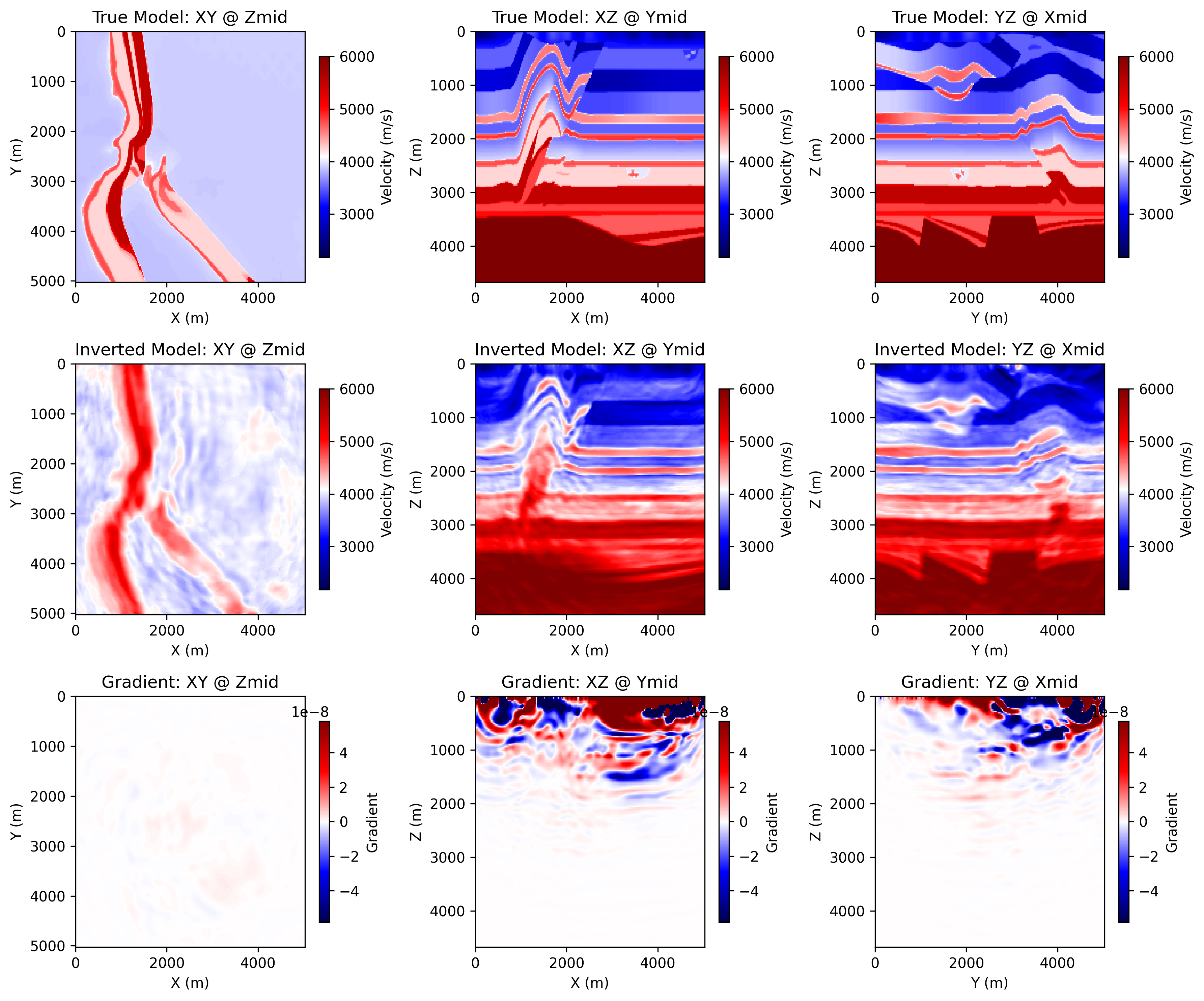
ricker.png: the source waveletobserved_data.png: an example observed shot gatherloss.png: the inversion loss curveepoch_XXXX.png: three orthogonal slices of the true model, the current inverted model, and the current gradient
Each backend writes into its own output directory:
acoustic_3d_fwi_overthrust_torch
acoustic_3d_fwi_overthrust_cuda
Example Figures
The following figures come from a completed CUDA run of the 3D Overthrust example.
epoch_0100.png: the saved progress panel at a later epoch, showing three
orthogonal slices of the true model, the current inverted model, and the
current gradient.
Running the Example
Step 1. Prepare the Overthrust 3D .npy files listed above if they do not
already exist.
Step 2. Choose the backend you want to use.
python3 examples/FWI/3d/acoustic/torch/fwi_overthrust.py --backend eager
python3 examples/FWI/3d/acoustic/torch/fwi_overthrust.py --backend cuda
Step 3. If memory is tight, retry with one-shot accumulation.
python3 examples/FWI/3d/acoustic/torch/fwi_overthrust.py --backend cuda --train-shot-batchsize 1
Step 4. Check the backend output directory for loss.png,
observed_data.png, and epoch_XXXX.png.