2D Acoustic FWI on Marmousi with Torch
Source file:
examples/FWI/2d/acoustic/torch/fwi_marmousi.py
What This Example Does
This example runs acoustic full-waveform inversion with one script that supports two propagator backends:
eager: pure PyTorch propagation throughPropTorch(..., backend="eager")cuda: compiled CUDA propagation throughPropTorch(..., backend="cuda")
The script:
- loads a true velocity model and a smooth initial model
- builds an acoustic solver for the selected backend
- generates observed data from the true model
- inverts the initial model by matching synthetic and observed gathers
Main Components
The solver is built from:
equation:Acoustic(...)propagator:PropTorch(...)wave: a Ricker waveletsources: regularly sampled source coordinatesreceivers: regularly sampled receiver coordinatesmodels: the velocity modelvp
Prepare the Marmousi Model Files
This example reads:
examples/models/marmousi/true.npyexamples/models/marmousi/smooth.npy
Generate them from the official Elastic Marmousi archive before running the example:
python3 examples/models/marmousi/download_marmousi.py --extract
python3 examples/models/marmousi/extract_model_segy.py
python3 examples/models/marmousi/convert_segy_to_npy.py
python3 examples/models/marmousi/prepare_fwi_models.py \
  --input examples/models/marmousi/npy/vp_1p25m.npy \
  --source-dh 1.25 \
  --target-dh 25.0 \
  --radii 8,8 \
  --passes 3
Optional preview:
python3 examples/models/marmousi/plot_models.py
The generated model files under examples/models/ are ignored by git. The
helper scripts in that directory remain tracked.
Backend Selection
Run the example with:
python3 examples/FWI/2d/acoustic/torch/fwi_marmousi.py --backend eager
python3 examples/FWI/2d/acoustic/torch/fwi_marmousi.py --backend cuda
The script keeps:
COMMON_CONFIG: shared acquisition and inversion settingsBACKEND_CONFIG: backend-specific options for the eager and CUDA paths
For BACKEND_CONFIG, the script uses:
EagerOptions(...)for the eager pathCUDAOptions(memory=...)for the CUDA path
Key Configuration
Shared configuration includes:
nt,dt: temporal samplingdh: spatial samplingspatial_order: finite-difference ordersrc_step,rec_step: acquisition sampling in the x directiontrue_model,init_model:.npyfiles loaded fromexamples/models/epochs,batchsize,lr: inversion hyperparameters
Backend-specific configuration includes:
- eager:
EagerOptions(use_compile=...)anduse_ckpt - CUDA:
CUDAOptions(memory=MemoryOptions(...))and display transpose rules for saved figures
Solver Setup
The equation side is shared across both modes:
equation = Acoustic(
    spatial_order=cfg["spatial_order"],
    device=dev,
    backend="torch",
)
Even when the solver runs with backend="cuda", the equation backend
remains "torch".
Shared propagator arguments are collected first:
prop_kwargs = dict(
    shape=shape,
    dev=dev,
    dh=cfg["dh"],
    dt=cfg["dt"],
    source_type=["h1"],
    receiver_type=["h1"],
    abcn=cfg["abcn"],
    free_surface=cfg["free_surface"],
    pml_type="cpmlr",
)
solver = PropTorch(
    equation,
    **prop_kwargs,
    use_ckpt=cfg["use_ckpt"],
    backend="eager",
    eager_options=EagerOptions(use_compile=cfg["use_compile"]),
)
solver = PropTorch(
    equation,
    **prop_kwargs,
    backend="cuda",
    cuda_options=CUDAOptions(
        memory=MemoryOptions(
            strategy="boundary",
            boundary=BoundaryOptions(...),
        )
    ),
)
Geometry
The example uses a fixed-depth surface acquisition:
- sources are placed every
src_stepgrid points - receivers are placed every
rec_stepgrid points - all sources use the same source depth
srcz - all receivers use the same receiver depth
recz
The final array shapes are:
sources:(nshots, 2)receivers:(nshots, nreceivers, 2)
Inversion Workflow
Observed data is generated first from the true model, then the inversion updates
the smooth model with torch.optim.Adam.
At each iteration, the script:
- selects a random subset of shots
- computes synthetic data
- evaluates the L2 data-misfit loss
- backpropagates gradients to
vp - updates the model
Outputs
The script creates an output directory under examples/ and saves:
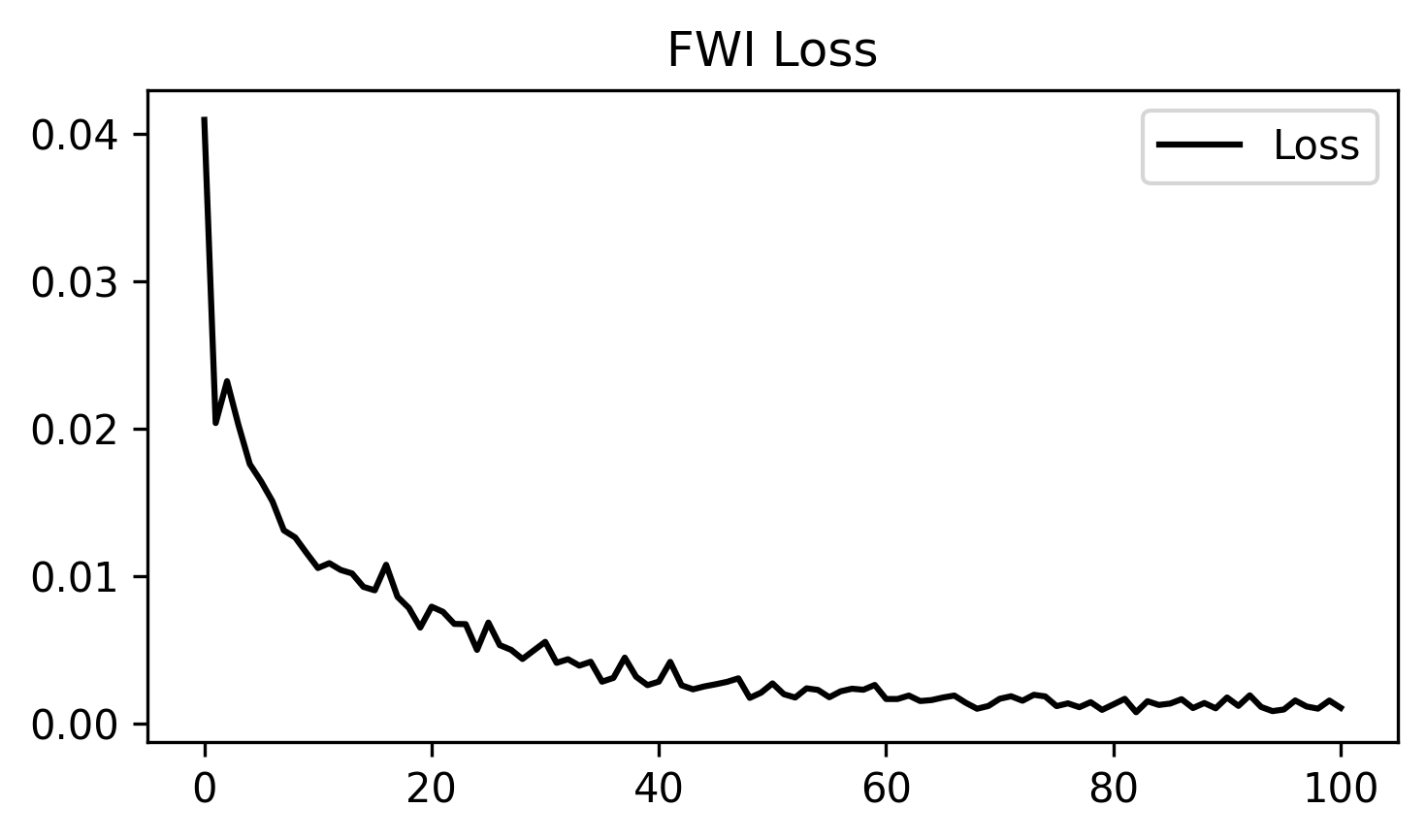
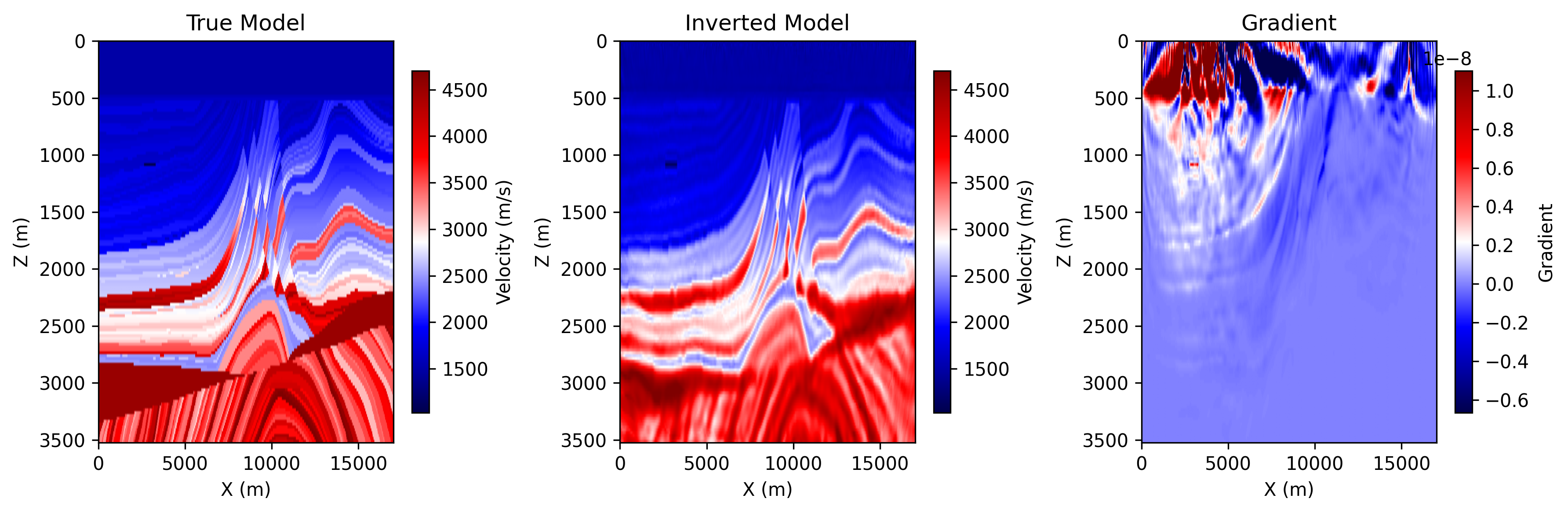
ricker.pngobserved_data.pngloss.pngepoch_XXXX.png: includes the true model, the current inverted model, and the current gradient
Each backend writes into its own output directory:
acoustic_fwi_torch
acoustic_fwi_cuda
Example Figures
The following figures show two common outputs from a completed acoustic FWI run.
loss.png: the inversion loss curve across optimization steps.
epoch_0100.png: the saved progress panel at the final shown epoch, including
the true model, the current inverted model, and the current gradient.
Running the Example
Step 1. Prepare the Marmousi .npy files listed above if they do not already
exist.
Step 2. Choose the backend you want to use.
python3 examples/FWI/2d/acoustic/torch/fwi_marmousi.py --backend eager
python3 examples/FWI/2d/acoustic/torch/fwi_marmousi.py --backend cuda
Step 3. Check the output directory for the saved figures.
Notes:
eagermode runs on GPU if available and otherwise falls back to CPUcudamode requires a CUDA-capable PyTorch environment and compiled binding